Games come first
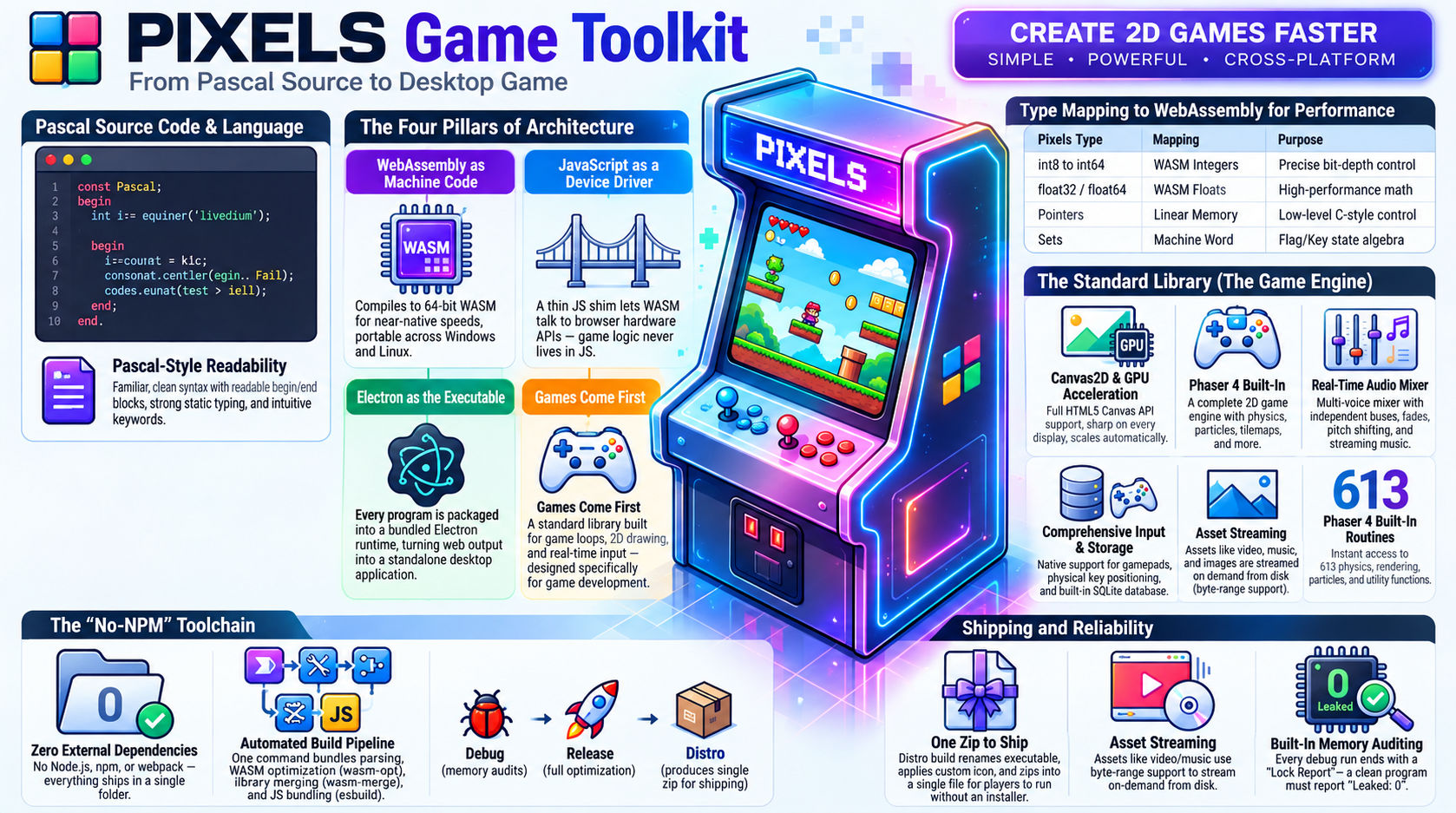
The standard library is a game library: a game loop, 2D drawing, sound, input, video, save data, menus, a database, and the Phaser 4 engine. Game-first, not games-only: the same language builds tools, utilities and data apps.
Write Pascal-style code.
Ship games to the desktop.
A general-purpose, game-first language that compiles to WebAssembly and ships as a desktop app for Windows and Linux. One folder, nothing to install.
PIXELS borrows everything a modern browser engine already does superbly, and hides every tool behind one command. You write the game. The compiler handles the rest.
The standard library is a game library: a game loop, 2D drawing, sound, input, video, save data, menus, a database, and the Phaser 4 engine. Game-first, not games-only: the same language builds tools, utilities and data apps.
PIXELS compiles to 64-bit WebAssembly: portable, sandboxed, near-native. One binary runs on both targets.
Thin JS shims expose the platform. Every entry is guarded, so a JavaScript exception can never crash into your code.
Every program becomes a real desktop app inside a pinned Electron 44.4.3. Players install nothing.
Every sample below ships with PIXELS and compiles as shown. Each one becomes a desktop window with a single command.
module exe hello;
@exeicon "$P:res/assets/icons/pixels.ico";
begin
println("Hello, I am %s! 🚀🔥✨", "PIXELS");
var i: int32 = 0;
var s: string = "PIXELS™ " + "Game Toolkit";
println(s);
for i := 1 to 10 do
println("%d", i);
end
end.
pixels hello -r builds it and opens an 800 x 600 window with the output inside.
begin ... end., and every block closes with its own end.module exe app_loop;
@exeicon "$P:res/assets/icons/pixels.ico";
import
canvas2d,
app;
var
x: float64;
updates: int64;
routine Update(const dt: float64);
begin
x := x + 120.0 * dt;
if x > 800.0 then
x := 0.0;
end;
updates := updates + 1;
if updates = 600 then
app.Quit();
end;
end;
routine Render();
begin
canvas2d.SetFillStyle("#000");
canvas2d.FillRect(0.0, 0.0, 800.0, 600.0);
canvas2d.SetFillStyle("#0f0");
canvas2d.FillRect(x, 280.0, 40.0, 40.0);
end;
routine Shutdown();
begin
println("shutdown handler");
end;
begin
x := 0.0;
updates := 0;
canvas2d.Init(800, 600);
canvas2d.SetPlacement(canvas2d.PLACE_FILL);
println("setup done, loop running");
app.Run(Update, Render, Shutdown);
end.
Hand app.Run three routines and the display drives the rest.
module exe input_square;
@exeicon "$P:res/assets/icons/pixels.ico";
import
canvas2d,
app,
input;
const
W = 800;
H = 600;
SPEED = 200.0;
var
x: float64;
y: float64;
boxSize: float64;
green: bool;
routine Update(const dt: float64);
begin
if input.KeyDown(input.KEY_LEFT) then
x := x - SPEED * dt;
end;
if input.KeyDown(input.KEY_A) then
x := x - SPEED * dt;
end;
if input.KeyDown(input.KEY_RIGHT) then
x := x + SPEED * dt;
end;
if input.KeyDown(input.KEY_D) then
x := x + SPEED * dt;
end;
if input.KeyDown(input.KEY_UP) then
y := y - SPEED * dt;
end;
if input.KeyDown(input.KEY_W) then
y := y - SPEED * dt;
end;
if input.KeyDown(input.KEY_DOWN) then
y := y + SPEED * dt;
end;
if input.KeyDown(input.KEY_S) then
y := y + SPEED * dt;
end;
x := x + input.GamepadAxis(0, input.AXIS_LEFT_X) * SPEED * dt;
y := y + input.GamepadAxis(0, input.AXIS_LEFT_Y) * SPEED * dt;
if input.MousePressed(input.MOUSE_LEFT) then
x := input.MouseX();
y := input.MouseY();
end;
if input.MousePressed(input.MOUSE_RIGHT) then
green := not green;
end;
if input.GamepadPressed(0, input.PAD_A) then
green := not green;
end;
boxSize := boxSize - input.MouseWheel() * 0.05;
if boxSize < 8.0 then
boxSize := 8.0;
end;
if boxSize > 200.0 then
boxSize := 200.0;
end;
if input.KeyPressed(input.KEY_SPACE) then
println("space pressed");
end;
if input.KeyPressed(input.KEY_ESCAPE) then
app.Quit();
end;
end;
routine Render();
begin
canvas2d.SetFillStyle("#000");
canvas2d.FillRect(0.0, 0.0, 800.0, 600.0);
if green then
canvas2d.SetFillStyle("#0f0");
else
canvas2d.SetFillStyle("#f80");
end;
canvas2d.FillRect(x - boxSize * 0.5, y - boxSize * 0.5, boxSize, boxSize);
canvas2d.SetFillStyle("#fff");
canvas2d.SetFont("16px monospace");
canvas2d.FillText("arrows/WASD/stick move - LMB teleport - RMB/A colour - wheel size - Space prints - Esc quits", 10.0, 20.0);
if input.GamepadConnected(0) then
canvas2d.FillText("gamepad 0 connected", 10.0, 40.0);
end;
end;
routine Shutdown();
begin
println("shutdown handler");
end;
begin
x := 400.0;
y := 300.0;
boxSize := 40.0;
green := true;
canvas2d.Init(W, H);
canvas2d.SetPlacement(canvas2d.PLACE_FILL);
app.SetTitle("PIXELS: Input");
println("setup done, loop running");
app.Run(Update, Render, Shutdown);
end.
One import gives you every input a game needs.
module exe audio_player;
import
audio,
canvas2d,
app,
input;
@assets "$P:res/assets/audio" "assets/audio" "*.ogg";
var
sfx: audio.Sound;
song: audio.Music;
routine Update(const dt: float64);
begin
if input.KeyPressed(input.KEY_ESCAPE) then
app.Quit();
end;
if input.KeyPressed(input.KEY_1) then
audio.Play(sfx);
end;
if input.KeyPressed(input.KEY_M) then
if audio.IsMusicPlaying() then
audio.StopMusic();
else
audio.PlayMusic(song, true);
end;
end;
end;
routine Render();
begin
canvas2d.SetFillStyle("#101820");
canvas2d.FillRect(0.0, 0.0, 800.0, 600.0);
end;
begin
canvas2d.Init(800, 600);
sfx := audio.LoadSound("assets/audio/sfx/samp0.ogg");
song := audio.LoadMusic("assets/audio/music/song01.ogg");
app.Run(Update, Render, nil);
end.
Sound effects, voices and streamed music, all from one module.
@assets line maps a folder; files stream from disk.Seventeen built-in types map straight onto WebAssembly. On top sit the tools systems programmers expect, plus safety nets neither ancestor had.
Modules, routine, begin ... end. and block-terminated control flow. No dangling else, no brace counting.
Exact-width integers, packed and aligned records, bit fields, overlays and typed pointers. Binary formats without hacks.
Format strings are decoded at compile time. A float passed to %d is a compile error, not garbage on screen.
Variable argument lists are type-checked at runtime: printf-style flexibility without undefined behavior.
Flags in one machine word, readable named states, and overloading with exact-match rules that never surprise you.
Strings and dynamic arrays are reference counted and freed for you. Everything else is yours. No GC, no pauses.
guard, except and finally on real WebAssembly exceptions. Even division by zero is catchable.
Private by default, qualified always, initialized in order. You always see where a name comes from.
import canvas2d; is the whole setup: the build finds the matching shim and bundles it. Nine modules plus Phaser, close to a thousand routines. Games come first, but nothing here is games-only: dom, sqlite3 and localstorage build tools and data apps just as well.
The fixed-step game loop, the window, frame rate, pause and resume, and timers.
The full Canvas 2D API, sharp on every display. Draw in logical pixels; crisp on HiDPI.
Physical keys, mouse and wheel, and up to four gamepads with analog triggers.
A real mixer: voices, streamed music with fades, three buses. Sound from the first frame.
mp4 and webm. Paint each frame into your canvas, or place the video on screen.
Save data and high scores, with typed helpers and keys private to your game.
Menus, HUDs and tool panels, with events you poll from the game loop.
A native message box, and web links opened in the player's own browser.
Real SQLite with the familiar prepare, bind and step shape, in your game's private data folder.
Phaser 4.2.0 bound as 613 routines: sprites, animations, tweens, arcade and matter physics, tilemaps, particles, cameras, a full loader and effects, with WebGL rendering. One import, no npm.
Behind pixels mygame -r the compiler runs the whole pipeline. You never orchestrate any of it.
Every tool ships in the folder. The optimizer, the merger, the bundler and two Electron runtimes are already there. No Node, no npm, nothing downloads on the first build.
A desktop editor built on Monaco, the editing surface inside VS Code. It runs the compiler's own language server, so what the editor tells you is what the compiler will say.
=== Unit Tests === Running 3 test(s)... [PASS] add returns correct sum [PASS] add handles negative numbers [PASS] strings clean up after themselves === Results: 3 passed, 0 failed, 3 total === [Heap] Allocs: 11, Frees: 11, Leaked: 0
-bm distro copies the app, renames the executable after your game, applies your icon, and zips it. A player unpacks it and double-clicks. No installer, no runtime, no browser.
-t linux-x64 packages the Linux build from the same Windows machine.Download the latest release, extract it, and put bin\ on your PATH. Windows x64 is the only requirement.
Build and run the first example. A window opens with its output.
pixels hello -r
Browse the sixteen examples and press F5 to play any of them.
pixels editor
Share what you make, ask questions, report issues, and help shape PIXELS.